

Worried about malware on your WordPress site? This guide on WordPress malware protection will provide you with essential steps to secure your site from malware threats. Learn how to keep your data safe and prevent future attacks.
Key Takeaways
- Regularly updating WordPress core, themes, and plugins is crucial for malware prevention and closing known security vulnerabilities.
- Implementing strong access measures, such as using strong passwords, enabling two-factor authentication, and monitoring user activity, significantly secure WordPress websites.
- Choosing a reputable hosting provider and using a robust security plugin are essential steps in fortifying WordPress against malware and unauthorised access.
- Regular backups are critical for recovering from attacks and maintaining site stability.
- Implementing these measures will help protect WordPress from hacking and other common security threats.
Understanding the Importance of WordPress Malware Protection
Malware can disrupt the smooth operation of a WordPress website, leading to reduced performance and negatively impacting the user experience. By employing stringent security measures, you can prevent malware infections, safeguarding both your site and its visitors. The infiltration of malware could result in unauthorised extraction of sensitive information, representing considerable WordPress security hazards.
If hackers manage to breach a WordPress website’s defences, they might gain improper access and manipulate it further. Establishing solid WordPress security is essential for keeping a site secure from malicious software while preserving consumer confidence and fidelity. Malicious programs may prompt search engines, like Google, to blacklist an infected website, which would drastically hinder visibility as well as incoming web traffic. Such issues with malware could demolish a webpage’s standing on search engine results pages (SERPs), causing substantial declines in organic visitor flow.
Comprehending how to protect against WordPress-related malware threats is vital for maintaining robust defence mechanisms within your online presence. Adopting comprehensive safeguards specific to WordPress will ensure safe browsing for users while protecting confidential data — ensuring that the operational integrity remains intact along with sustained SEO positioning.
Common Types of WordPress Malware
Various forms of malware frequently target WordPress sites, including insidious code injections, concealed backdoors, and deceptive phishing expeditions. These malicious code injections can introduce damaging scripts (like hacktools) that allow intruders to execute detrimental activities on the compromised websites. In some instances, redirector malware may tamper with a site’s configuration to redirect users toward harmful files or scam-oriented webpages.
Attackers often utilise backdoors to discreetly maintain their access within a WordPress website by exploiting security loopholes. These are typically well-disguised amongst other legitimate WordPress source files. Phishing schemes involve creating counterfeit pages resembling authentic ones with the intention of capturing confidential user data. SEO spam is a type of malware that adds unwanted links to your site, tricking search engines and confusing visitors. Understanding these common malware threats and their risks is key to creating strong defenses for your website.
Appreciating the variety of malware aimed at WordPress websites empowers you to engage in preventive protective actions. Establishing strong security measures coupled with continuous alertness fortifies your site against threats and ensures visitors enjoy a secure browsing environment.
Essential Steps to Secure Your WordPress Site Against Malware
Implementing security measures on your site is essential to safeguard against malware. It’s important to keep the wordpress core, along with any themes and plugins, updated regularly in order to patch up any known security vulnerabilities that could be exploited by hackers. Strong passwords and restricting the number of login attempts can help deter unauthorised access through brute force attacks. Adding two-factor authentication provides a barrier, preventing attackers from gaining entry into your site even if they manage to decipher your password.
Adhering to these fundamental best practices not only keeps your site secure, but also bolsters the defences of your website against future intrusions. To augment WordPress security and mitigate potential security issues effectively, implementing advanced protective measures beyond just basic ones is highly recommended. These proactive steps will significantly elevate protection levels for your website from malevolent forces seeking exploitation opportunities.
Regularly Update WordPress Core, Themes, and Plugins

It is imperative to perform regular updates in order to seal off potential security breaches that could be exploited by hackers. Maintaining the latest versions of WordPress core, themes, and plugins is a critical aspect of safeguarding your site. An older WordPress version tends to contain unpatched security flaws, making it more prone to being compromised.
To rectify any emerging security issues promptly, it’s advised that you update your site on a weekly basis. Outdated themes and plugins can provide easy access points for cyber attackers. It’s important to always ensure you have a full backup of your site before implementing updates and verify the compatibility of your plugins with the new WordPress version.
Consistently applying fresh updates to the WordPress core along with its associated themes and plugins acts as an effective defense mechanism against hacking attempts targeting outdated software components. Adhering diligently to this routine practice forms an essential element in adhering to recommended WordPress security best practices.
Use Strong Passwords and Limit Login Attempts
To ensure the security of WordPress accounts, it’s imperative to use passwords that are both strong and unique. When creating usernames and passwords for WordPress, they should be a minimum of 20 characters long and include a mix of uppercase letters, lowercase letters, numbers, and special characters. The practice of limiting login attempts is effective in thwarting brute-force attacks by capping the number of permissible failed login attempts. Having a robust password plays an instrumental role in safeguarding one’s account.
The Limit Login Attempts Reloaded plugin is available to restrict how many times someone can attempt to log into WordPress. Pair this with implementing Two-Factor Authentication (2FA) as well as establishing timeout periods for users who appear suspicious or repeatedly fail login attempts helps bolster defences against brute force assaults on your site’s access points. Altering the default admin username also contributes significantly towards diminishing vulnerability from such incursions. Monitoring activity related to logging into WordPress is likewise beneficial for maintaining heightened vigilance over account safety.
Applying additional layers of protection directly at the server level fortifies both administrative areas and pages used for logging into WordPress from potential hacker breaches. Curtailing opportunities for brute-force invasions via XML-RPC by deactivation, shields your website even more effectively because it precludes assailants from testing countless combinations quickly.
Ultimately, incorporating these various proactive strategies will substantially upgrade overall site defence measures against infiltration endeavours without proper authorisation.
Enable Two-Factor Authentication (2FA)
Two-factor authentication strengthens your login security by necessitating not only a password but also a physical device, creating an additional defence barrier. Activating two-factor authentication markedly bolsters protection as it introduces another verification phase that thwarts intruders from gaining entry if they somehow obtain the password.
For incorporating two-factor authentication into your WordPress site, you’ll need to set up the WP 2FA plugin and tailor its options, mandating the use of a one-time code for each log-in attempt. Suggested applications for generating these codes include Google Authenticator, Authy, and LastPass Authenticator.
By implementing two-factor authentication on your site, you erect yet another hurdle against potential hackers who might possess your password—substantially uplifting the safeguarding measures of your online presence.
Implementing a Web Application Firewall (WAF)
A Web Application Firewall (WAF) serves as a protective shield around web applications, scrutinising and filtering incoming traffic to detect and prevent malicious attempts. These firewalls are engineered to safeguard against various web application threats such as SQL injection attacks and cross-site scripting (XSS). Employing a website firewall aids in averting service interruptions by preventing attacks upstream, thus maintaining uninterrupted access to the website.
When set up correctly, WAFs can efficiently counter zero-day exploits through an examination of abnormal traffic patterns. Utilising signature-based detection methods enables these firewalls to recognise potential dangers by matching inbound data with established profiles of known attack vectors. WAFs employ behaviour-based detection mechanisms that highlight irregular user behaviours diverging from established norms—potentially signalling security breaches.
Deploying a Website Application Firewall can be accomplished either via plugins or using hosting services tailored for this purpose. Installation is typically simple with these pre-configured options available for use with plug-ins or host solutions. Select the most suitable firewall option and plugin based on your specific requirements for optimal protection.
Conducting Regular Malware Scans
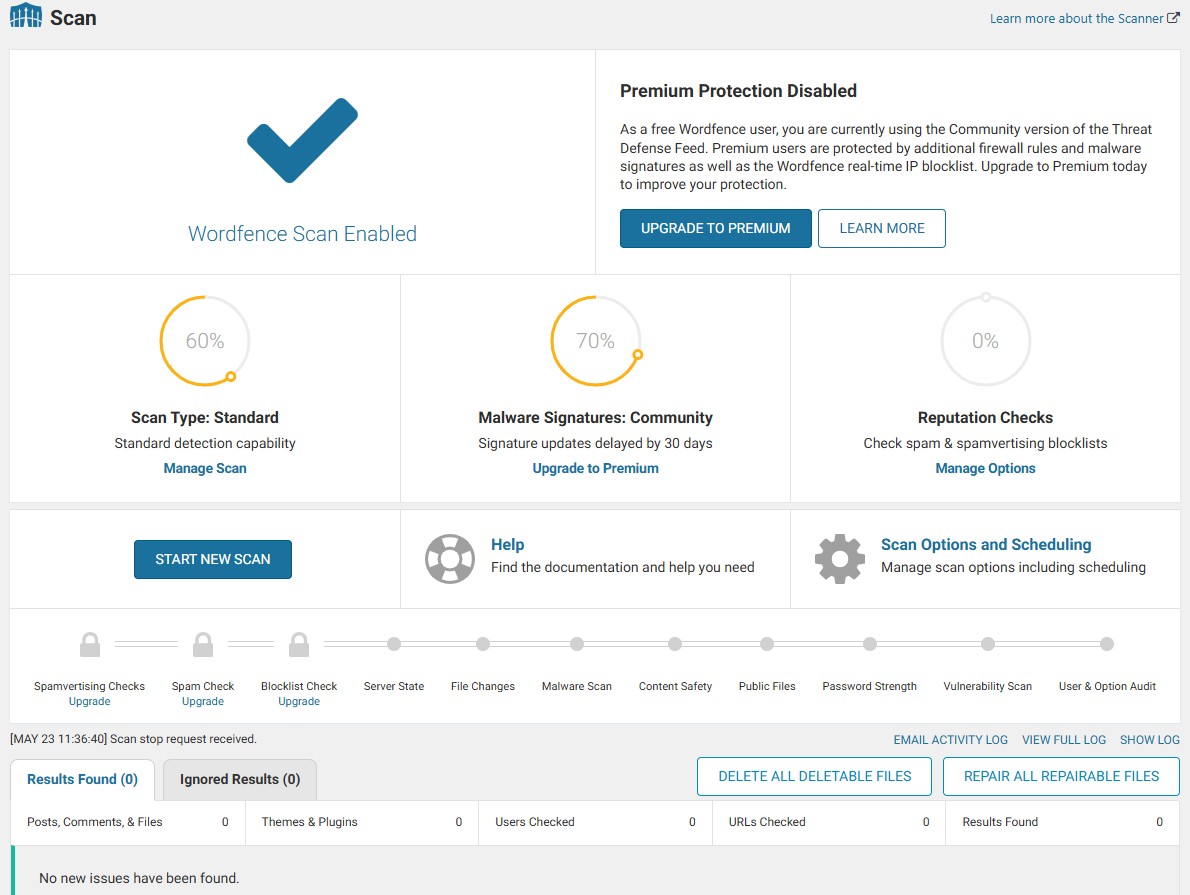
It’s critical to perform consistent malware scans on your site to detect and eliminate any malicious software. Jetpack Scan conducts these scans daily, promptly notifying users of any dubious activity it uncovers. Utilising security plugins like Wordfence is an efficient way to automate this process and stay informed about potential security concerns via alerts.
Wordfence is renowned for its comprehensive security coverage, offering a robust firewall and malware scanner that continuously monitors your WordPress site for threats. It provides real-time alerts about any suspicious activity, ensuring you can respond swiftly to potential security breaches. Wordfence’s malware scanner checks core files, themes, and plugins for malicious code, backdoors, SEO spam, and malicious redirects.
Jetpack Scan not only detects threats but also offers a straightforward solution for most recognised hacks with its one-click automatic fix feature. In instances where malware is found but cannot be rectified automatically, seeking out a professional or employing another security plugin like Wordfence for diagnosis is advisable. Those subscribed to certain premium plans can access the history logs of Jetpack Scan, allowing them to scrutinise prior scan outcomes.
Although many security scanners have the capability to alert you regarding the presence of malware, they often lack the functionality required for complete removal without additional actions being taken. For comprehensive protection, it’s advisable to consult with a professional security service like Resolve Website Support. We specialise in continuous monitoring and malware removal, ensuring your website remains secure. Committing to regularly scheduled malware scans remains crucial in upholding robust website protection against prevalent cyber hazards.
Choosing a Reputable Security Plugin
When choosing a security plugin for your site, it’s crucial to look for vital functionalities such as malware detection, eradication capabilities, and firewall protection. Wordfence is noted for providing firewall protection, conducting malware scans, monitoring login attempts, and offering various additional sophisticated features. Sucuri Security also comes highly recommended due to its strong malware scanning abilities.
The Aspire Security Suite boasts an effective firewall but falls short when it comes to removing malware. iThemes Security has also recently gained popularity but it doesn’t offer potent malware scanning or removal services. Therefore, trustworthy security plugins like Wordfence Security and Sucuri Security are celebrated for their proven efficacy.
Opting for reputable plugins is beneficial in ensuring stability and mitigating the risks that come with using lesser-known options that could compromise security. It is essential when picking out a WordPress security plugin to consider one that won’t overburden server resources so as not to impede website functionality. Making the right choice in selecting either a reputable free plugin or among premium WordPress security plugins can immensely bolster the safeguarding of your WordPress website against harmful threats.
Secure Hosting Provider Selection
An esteemed hosting provider often encompasses essential security features such as SSL certificates, automated data backups, and web application firewalls. To defend against prevalent online hazards, superior hosting services incorporate DDoS protection and anti-spam measures. A commendable hosting plan indeed comprises a dedicated firewall tailored for the web server.
Securing a host with an exemplary uptime record is vital to ensure your website remains accessible at all times. When vetting a potential hosting provider’s technical support capabilities, it’s important that they provide access to skilled professionals. The finest in the business also perform regular vulnerability scans to spot any security loopholes on your site.
Leading hosts facilitate compatibility with trusted security plugins like Wordfence or Jetpack, augmenting your website’s defences further. Opting for providers that furnish staging environments can be advantageous. This enables secure experimentation and updating before going live with changes or new additions. Prioritising security when searching for WordPress hosting services should not be overlooked — choose wisely since these entities partner with you in safeguarding your digital presence.
Advanced Techniques to Enhance WordPress Security
It is advised to turn off XML-RPC since its request structure can exacerbate brute-force attacks and introduce security vulnerabilities. By frequently updating site passwords and choosing uncommon usernames, one can greatly diminish the likelihood of credentials being breached. To put advanced security strategies into action, you need administrator rights along with a substantial understanding of technology.
To significantly improve WordPress security beyond elementary steps, it’s crucial to employ more complex tactics. These methods include prohibiting file modification within the dashboard, turning off PHP file execution in certain directories, and altering the preset database prefix that comes with WordPress installations. When these sophisticated protocols are applied, they substantially bolster your website’s defences against more intricate attack strategies.
Disable File Editing in WordPress Dashboard
To prevent unauthorised modifications to PHP files on your WordPress site, you can disable file editing within the WordPress dashboard. This security measure is crucial for preventing attackers who may attempt to alter files if they manage to infiltrate your system. You can achieve this by inserting define( ‘DISALLOW_FILE_EDIT’, true ); into the wp-config.php file.
By taking this straightforward action, you elevate the security of your WordPress site. It ensures that intruders, even if successful in accessing your WordPress dashboard, are unable to make changes to PHP files or insert harmful, malicious code.
Restricting file editing serves as a safeguard for the essential core files and scripts governing file permissions on your website against illicit alterations.
Disable PHP File Execution in Certain WordPress Directories
Enhancing the security of your WordPress site by restricting PHP file execution within select directories is a powerful measure against malware threats. By preventing potentially harmful scripts from operating in commonly targeted areas such as wp-content/uploads, you significantly minimise the chances of unauthorised script activity.
This protective action can be accomplished through the Hardening option available in Sucuri’s plugin or manually by incorporating ‘deny from all’ into the.htaccess file located in specific directories. Not only does this secure your WordPress installation against illicit scripts and malware, but it simultaneously contributes to disabling directory indexing.
Change Default WordPress Database Prefix
WordPress employs ‘wp_’ as its standard prefix for the database. Modifying this preset prefix is crucial because it shields your site from SQL injection attacks and makes such attempts more difficult.
You have the option to alter the WordPress database prefix by utilising a plugin or you can opt to manually adjust the wp-config.php file and revise the names of your database tables accordingly. Implementing this extra measure of security substantially bolsters your website’s defences against assaults targeting your database.
Monitoring and Logging User Activity
It is essential to keep a watchful eye on user activities within your WordPress site, as this vigilance is key in spotting potentially harmful conduct that could compromise the integrity of the site. Ensuring all WordPress users are held responsible for their actions serves as both an oversight mechanism and a preventative measure against unauthorised endeavors. Keeping meticulous records of user accounts and their respective permissions – complete with time-stamped events, identification data, and descriptions of modifications made – is critical for effective surveillance.
Employing tools like WP Activity Log can prove invaluable when it comes to documenting every alteration within wp admin areas, presenting an exhaustive chronicle of each action taken by users. The ability to receive instant notifications through these monitoring systems empowers administrators to act swiftly against any unusual or alarming behavior, thereby fortifying the website’s defenses.
Diligent recording not only aids in upholding stringent security measures, but also fulfills audit requirements and complies with legal regulations by providing indispensable evidence whenever necessary. Persistent scrutiny over user interactions ensures that your WordPress environment remains secure while promoting accountability amongst its members.
Backup Strategies for WordPress Sites
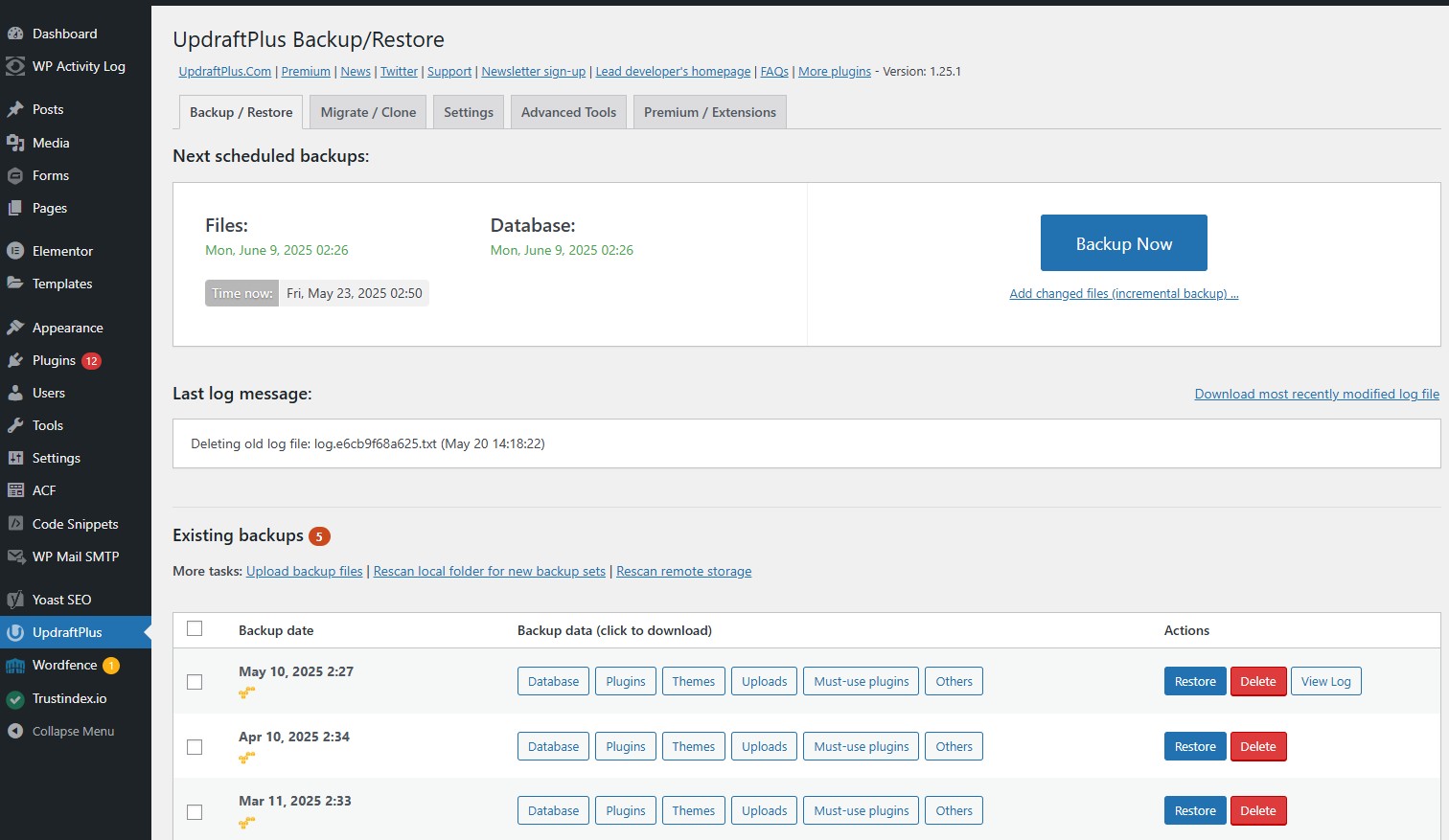
Backups serve as an essential safeguard for WordPress site security, enabling the preservation of content and swift restoration in the event of data loss. If a WordPress site is breached, it may result in financial setbacks, reduced website traffic, and expenses associated with recovery efforts. Storing backups off-site using cloud services significantly increases protection against any potential data compromise.
Employing a specialised tool dedicated to managing WordPress can streamline the backup routine. UpdraftPlus is a popular choice that offers a comprehensive range of encrypted backup options, including scheduled backups and real-time synchronisation of changes. It’s crucial to store regular backups externally to guard them from unauthorized breaches.
The backing up procedure with UpdraftPlus is straightforward, allowing you to back up your site directly to cloud storage services such as Google Drive, Dropbox, or Amazon S3. Automating this process guarantees that backups are performed consistently without relying on manual operations each time. In situations where your WordPress site faces compromise or corruption issues, reinstating the latest unaffected backup before such events took place offers an effective means for website recovery.
Let Resolve handle your website security
Implementing fundamental safeguards on your own is possible. Continuous monitoring, the elimination of malware, and malware prevention are our specialties. Our website support packages encompass consistent scanning, firewall defence, and prompt assistance when it’s needed.
Explore our options and trust Resolve with your website security to ensure that your site stays protected, secure, and operates without interruption. Our specialised team delivers top-notch WordPress security services tailored to you, which incorporate an SSL certificate to maintain the steadfast security of your site.
Final Thoughts
Protecting your WordPress site goes beyond simply adding a WordPress security plugin—it involves developing an all-encompassing approach to safeguard against various vulnerabilities. Significantly bolster the safety of your site by staying up-to-date with WordPress core updates, enforcing the use of robust passwords, activating two-factor authentication, and employing advanced protective measures.
It’s crucial for successful WordPress security that you remain vigilant. Keep a routine check on your website through constant monitoring, tracking user activities, and performing regular backups. These are critical steps in protecting your website from unexpected dangers. Take proactive measures now to fortify the defenses of your WordPress site and guarantee a secure browsing experience for all users who visit it.