


Looking to pass Google core web vitals for your WordPress site? This guide will show you how. We’ll discuss practical tips to improve metrics like Largest Contentful Paint (LCP), First Input Delay (FID), and Cumulative Layout Shift (CLS). Implement these steps to enhance user experience and boost your search engine rankings.
Key Takeaways
- Core Web Vitals, including LCP, FID, and CLS, are critical metrics for evaluating WordPress performance and user experience, impacting search engine rankings.
- Optimizing for each metric requires strategies such as improving server response times, reducing JavaScript execution times, and defining dimensions for media to enhance loading speeds and stability.
- Regular monitoring and maintenance using tools like Google Search Console and PageSpeed Insights are essential to maintain and improve your Google Core Web Vitals scores over time.
Understanding Core Web Vitals
Core Web Vitals are a collection of crucial indicators designed by Google to assess both website performance and the user experience. These metrics, namely Largest Contentful Paint (LCP), First Input Delay (FID), and Cumulative Layout Shift (CLS), play a pivotal role in ensuring an optimal user experience while also contributing to better search engine placement. For superior site functionality, it’s imperative for webmasters to grasp these metrics thoroughly and enhance them accordingly.
Achieving high scores on Core Web Vitals signifies much more than mere statistical success. They reflect the degree of user-friendliness your site provides. A web portal with outstanding Core Web Vitals offers not only swift loading times but also efficient response to users’ actions, along with consistent visual stability as one navigates through its pages. Disregarding these critical aspects could lead to unsatisfactory experiences for visitors, diminishing conversion rates, and potential downgrades in search ranking positions, underscoring why it is vital to concentrate on refining core web vitals.
Google periodically updates what constitutes acceptable Core Web Vitals standards based on changing expectations for online encounters. Remaining updated regarding such changes and regularly analyzing your website’s operational level is essential.
Each aspect influencing those fundamental scores—including elements like hosting services, page building tools/plugins/fonts used, CDN deployment or webpage layout—must be considered carefully. Examining each of the trio of main components – LCP, FID, CLS – will shed light on their respective importance within overall virtual presence enhancement strategies.
Largest Contentful Paint (LCP)
The Largest Contentful Paint (LCP) metric evaluates the duration needed for the most significant visible content on a webpage to fully display, which is crucial in shaping how users perceive page load times. The element being measured could be anything from an image or video to substantial text sections within view. To achieve a favorable LCP score, it’s essential for this primary element to load expediently—ideally within 2.5 seconds—to deliver users a swift and seamless browsing experience.
To optimize your website’s LCP, various factors should be considered: these include refining image sizes, boosting server response efficiency, and reducing resources that block rendering. Implementing a content delivery network (CDN) can aid in diminishing loading durations by hosting static assets on servers geographically nearer to the user.
By concentrating efforts on these key areas and accelerating the loading time of prominent content pieces on your pages, you’re taking critical steps toward enhancing overall site performance and user satisfaction.
First Input Delay (FID)
First Input Delay (FID) is a metric that gauges the duration between a user’s initial interaction with your webpage (such as tapping on a button or clicking on a link) and the browser’s response to that action.
For an optimal FID score:
- Aim for below 100 milliseconds, which contributes to creating an interactive and prompt experience for users.
- Scores ranging from 100 to 300 milliseconds suggest there are areas where responsiveness can be enhanced.
- Exceeding 300 milliseconds in delay may substantially impair the user’s experience.
To ameliorate FID, it is crucial to lessen how much time long tasks occupy the main thread. This improvement can be accomplished by refining JavaScript execution along with curtailing script processing times. Ensuring swift responsiveness during interactions helps deliver an inviting environment free of aggravation for users.
Cumulative Layout Shift (CLS)
Cumulative Layout Shift (CLS) measures the visual stability of a webpage by tracking unexpected shifts in layout during the page load. These shifts can be caused by elements loading at different times, undefined sizes for images, ads, and custom fonts. A good CLS score is below 0.1, ensuring that users don’t experience annoying layout shifts that can lead to missed clicks and a frustrating browsing experience.
Improve your CLS score by defining dimensions for media elements, reserving space for ads and embeds, and optimizing font loading. These steps will help maintain a stable layout, providing a smoother and more predictable user experience.
Measuring Core Web Vitals on Your WordPress Site
To improve your WordPress site, it’s essential to begin by measuring its Core Web Vitals. By using resources such as PageSpeed Insights, Google Search Console, and Chrome DevTools, you can gain valuable insights into how well your site is performing and the quality of user experience it provides. Continuously monitoring these metrics allows for the identification of specific issues so that focused improvements can be made to boost overall performance.
Both field data, which reflects real users’ experiences with your website’s performance, and lab data from a controlled test environment are important in grasping how users interact with your site under actual usage conditions and pinpointing areas where there might be delays or other problems.
We will delve into the available tools and techniques for accurately measuring Core Web Vitals. This examination will provide a deeper understanding of how to analyze these key web vitals effectively through different methods supported by search console capabilities.
Using PageSpeed Insights
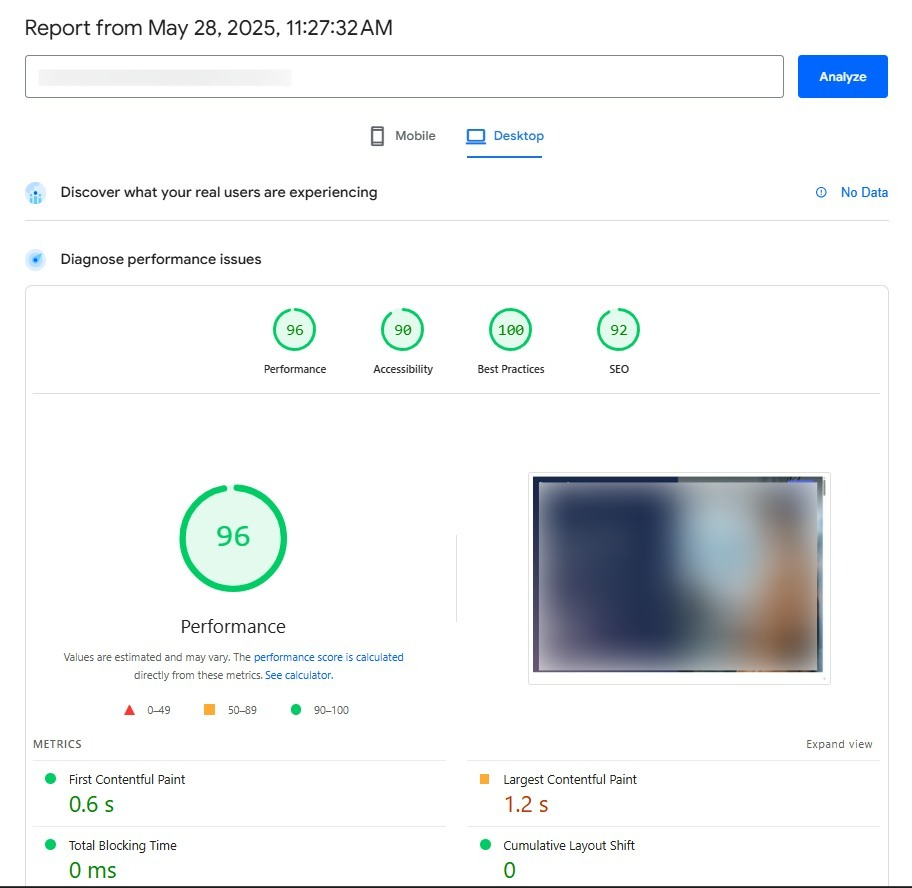
PageSpeed Insights serves as a robust and intuitive instrument for evaluating Core Web Vitals, requiring only the insertion of your website’s URL to deliver an in-depth analysis of its performance across mobile and desktop devices. Atop this web page report is a visual representation indicating the site’s performance score, which acts as an immediate indicator of your site’s general status.
Within the report lies extensive information on all three core metrics associated with Core Web Vitals, along with tailored guidance on how to enhance these areas. The diagnostics section offers additional insight by pinpointing elements like the Largest Contentful Paint while highlighting potential areas for optimization. For those utilizing WordPress, tools such as WP Rocket and NitroPack can provide extra support in refining Core Web Vitals by optimizing speed and performance.
Leveraging Google Search Console
The Google Search Console provides a comprehensive Core Web Vitals reports, which enables you to monitor the performance of individual URLs and obtain a thorough understanding of user experiences across mobile and desktop platforms. The Core Web Vitals report in the console offers a summary that highlights URL performance and assists in pinpointing pages requiring improvement as well as troubleshooting website problems.
Once improvements are made based on these insights, it may take up to two weeks for validation processes to update reflecting those changes. Consequently, it’s crucial to consistently review and modify your site with guidance from these reports. Leveraging the Google Search Console for tracking your web vitals is essential for optimizing user experience and boosting your position in search engine rankings.
Utilizing Chrome DevTools
Chrome DevTools serves as a critical instrument for web developers, providing the capability to test and diagnose your website’s performance and Core Web Vitals in real time. By performing Lighthouse tests while in Incognito mode, you eliminate disruptions from cached data and browser extensions, leading to more precise outcomes.
Within Chrome DevTools lies the Lighthouse tool, which delivers detailed evaluations of Core Web Vitals along with practical recommendations for enhancements. You can initiate an analysis of these vitals by right-clicking on a webpage, selecting “Inspect,” then navigating to the “Performance” section. This enables you to pinpoint opportunities for improving site performance.
Applying the insights garnered from these analyses can lead to substantial improvements in how your website performs.
Optimizing for Largest Contentful Paint (LCP)
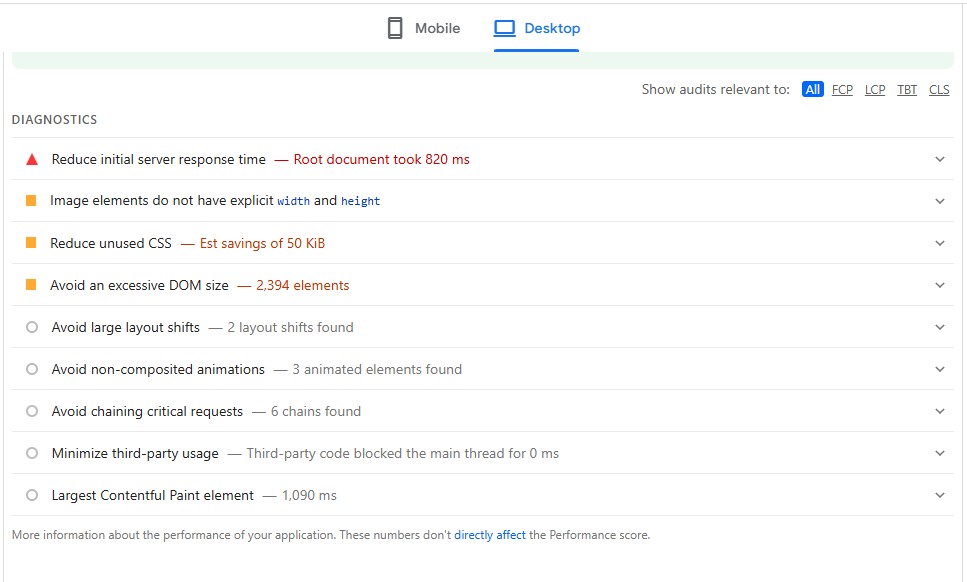
To enhance the Largest Contentful Paint (LCP) metric, it is essential to adopt various techniques that expedite the loading of the most prominent element on your webpage. This can be achieved by bettering server response times, streamlining images, and reducing resources that impede rendering – all vital for an impressive LCP rating. An improved LCP does not only improve user satisfaction, but also boosts your website’s search engine rankings.
Employing a content delivery network (CDN) to distribute static assets such as images is an effective approach in curtailing load durations and bolstering site performance. We’ll now explore specific methods for optimizing LCP with greater detail.
Optimize Images
Enhancing LCP is highly dependent on image optimization. Utilizing compression tools such as ShortPixel or Photoshop allows for effective encoding of images, reducing their size while maintaining visual fidelity. Adopting modern formats like WebP can lead to an average file size reduction of about 26% when compared with PNGs.
Improvements in loading performance are achievable by implementing lazy loading for offscreen images and appropriately resizing images to fit mobile device screens. Image optimization plugins including ShortPixel and WebP Converter For Media, along with most other similar plugins, offer automation capabilities for these tasks, which facilitate the process of ensuring a WordPress site loads quickly through optimized image handling that includes lazy load features.
Improve Server Response Times
To enhance the Largest Contentful Paint (LCP), it is crucial to improve server response times. Selecting a hosting provider that offers rapid services and servers situated near your audience can significantly diminish latency, thereby boosting server performance. It’s also advisable to consider cloud hosting as an alternative to shared hosting for better results.
Using caching plugins like WP Rocket and SG Optimizer can significantly enhance your WordPress site’s performance. These tools implement advanced caching techniques that speed up your site by storing static versions of your pages, reducing server response times and making your WordPress site faster and more efficient.
Minimize Render-Blocking Resources
Minimizing CSS render-blocking resources is essential for decreasing Largest Contentful Paint (LCP). Prioritizing the rendering of crucial content can be achieved by deferring non-essential CSS and javascript files and embedding critical inline CSS. Compressing both CSS and JavaScript files could lead to a reduction in file size by as much as 40%, which enhances loading times and overall website performance. Adopting best practices for streamlined styling is recommended to Optimize your CSS.
To significantly boost load speeds, it’s advisable to periodically eliminate superfluous components from your site, such as bulky themes or an excess of plugins. Streamlining the aesthetic design along with minimizing features like columns or widgets can also contribute positively to optimizing performance on WordPress websites.
Enhancing First Input Delay (FID)
Improving the First Input Delay (FID) requires adopting a range of tactics aimed at making sure your website reacts quickly to users’ actions. This involves minimizing the time it takes for JavaScript to execute, streamlining tasks that occupy the main thread, and implementing browser caching. These critical measures contribute significantly to attaining an impressive FID rating, ultimately leading to a user experience that is both responsive and captivating.
Now let’s delve into each tactic more thoroughly.
Reduce JavaScript Execution Time
Minimizing the time it takes for JavaScript to execute is critical in enhancing First Input Delay (FID). Eliminating JavaScript that isn’t being utilized can greatly boost site performance. Tools such as Asset CleanUp and Perfmatters are beneficial when looking to streamline this process. Refining non-essential plugins and third-party scripts is important because they can detrimentally affect your website’s efficiency.
Segmenting extensive tasks into smaller, asynchronous segments will help reduce JavaScript execution time, leading to improved responsiveness of your site. By hosting Google Fonts on your own servers and preloading them, you can also expedite font loading times significantly.
Optimize Main-Thread Work
Optimizing main-thread work involves reducing heavy javascript code and CSS tasks, particularly from jQuery plugins. Utilizing web workers allows JavaScript tasks to be handled on separate background threads, reducing the workload on the main thread.
Web workers enhance site performance by enabling scripts to run in the background, freeing up the main thread for immediate user interactions. By limiting heavy tasks on the main thread and utilizing web workers, you can significantly improve responsiveness and user experience.
Enable Browser Caching
Utilizing browser caching is crucial for cutting down on load times because it allows static assets to be stored locally. By employing plugins such as WP Rocket, you can dramatically cut back on the frequency with which these static assets need to be downloaded again. It’s advised that the cache expiration period for these static assets is set at 180 days.
By putting browser caching into effect, you guarantee quicker loading periods when visitors come back to your site, thereby boosting its overall efficiency.
Improving Cumulative Layout Shift (CLS)
Improving Cumulative Layout Shift (CLS) is crucial for maintaining a visually stable WordPress website. Unexpected layout shifts can frustrate users and lead to a poor user experience.
To achieve a good CLS score, it’s essential to focus on specifying dimensions for media, reserving space for ads and embeds, and optimizing font loading.
Specify Dimensions for Media
By setting the width and height for images, browsers are able to determine the necessary space needed, which decreases layout shifts when pages load. Allocating the appropriate amount of space during loading is made possible by specifying both width and height attributes for images, thus avoiding any unforeseen adjustments in the page layout.
Automation tools such as WP Rocket’s Media settings can facilitate this task by ensuring that all images come with predetermined dimensions.
Reserve Space for Ads and Embeds
By setting aside space for advertisements and embedded content with predetermined sizes, you can mitigate the occurrence of layout shifts during their loading. Establishing specific dimensions for ads within your code and applying CSS to designate a minimum height for Google AdSense elements contributes to preserving a consistent layout.
Reserving this space in advance allows you to prevent significant layout alterations, thereby improving the overall experience for users.
Optimize Font Loading
Ensuring text remains visible during font loading is essential to avoiding layout shifts and improving user experience. By utilizing the ‘font-display: swap’ property in CSS, you can help mitigate any disruptions caused by fonts as they load, thereby enhancing website performance.
Incorporating the ‘font-display: swap’ strategy into your web design significantly enhances user experience by eliminating interruptions in page layout attributed to delayed font rendering. Concentrating on such optimizations fosters visual stability throughout your site, guaranteeing a seamless navigation experience for users.
Advanced Techniques for Better Core Web Vitals Scores
Consider adopting advanced methods like preloading key resources, leveraging a Content Delivery Network (CDN), and fine-tuning web fonts to enhance your Core Web Vitals scores further.
By employing these tactics, you can substantially boost your website’s efficiency and user experience, which is crucial for distinguishing yourself in the competitive digital landscape via search engine optimization.
Preload Critical Assets
Prioritizing the loading of essential elements such as images and fonts through preloading can lead to quicker display of primary content. The implementation of this performance enhancement is simplified by tools including WP Rocket and the Flying Pages plugin, which offer support for link preloading.
By establishing a preliminary connection with necessary third-party domains via preconnecting, it’s possible to diminish overall load times.
Utilize a Content Delivery Network (CDN)
Using a Content Delivery Network (CDN), static assets can be cached on servers strategically located near users in various regions, which can significantly reduce page load times. By dispersing these static resources across numerous servers around the globe, loading speed is improved and overall performance is boosted when integrated with a commercial DNS service.
Optimize Web Fonts
Utilizing subsets of fonts can diminish the file size, which results in faster loading times and elevates overall site performance. It is crucial to limit the quantity of web fonts on your website to boost loading speeds and enhance performance.
Through the strategic use of a minimal number of web fonts that encompass only vital characters and styles, you can markedly improve both site performance and user experience.
Regular Maintenance and Monitoring
It’s crucial to engage in consistent upkeep and supervision to maintain the best possible website performance and Core Web Vitals scores. Employing tools such as WP Rocket or Nitropack can streamline numerous enhancement processes automatically, aiding in keeping your Core Web Vitals scores at a desirable level.
Tools for monitoring like Google Analytics and Google Tag Manager offer valuable information that assists you in following your site’s performance metrics and user experience closely. This ensures any emerging problems are identified and dealt with quickly.
Regularly Update Plugins and Themes

Regularly updating the elements of your WordPress website, including plugins and themes, ensures that you take advantage of enhancements in both security and performance. These updates often bring about improvements that optimize usability and reduce load times.
While it might be tempting to set up auto-updates, it’s not advisable due to potential incompatibilities between plugins, themes, and WordPress versions. This process should be done manually to avoid issues, but it can be time-consuming and challenging if you’re not tech-savvy. Consider using a website maintenance company like Resolve to handle this task efficiently. Their expertise ensures that updates are managed smoothly, preserving peak performance levels and robust security measures for your site.
Monitor Performance Metrics
Keeping an eye on Core Web Vitals is crucial for maintaining your website’s performance and the overall experience of your users. Leveraging tools such as Google Analytics can assist in detecting and resolving any issues that may impact these Core Web Vitals.
It’s advisable to evaluate your Core Web Vitals metrics regularly, ideally on a monthly or quarterly basis, to confirm that the site performance remains at its best.
Conduct Periodic Audits
By conducting frequent audits with tools such as Lighthouse, you can identify emerging performance issues on your website. These regular checks enable you to proactively address any concerns and confirm that your site adheres to the most current benchmarks for performance.
Final Thoughts
In summary, it is crucial to focus on Core Web Vitals for the dual benefits of improving user experience and elevating search engine rankings. Grasping these metrics and applying recommended tactics can greatly improve the performance of your WordPress site.
Consistent upkeep and vigilance are essential to maintain these gains. Be diligent in keeping plugins and themes up-to-date, tracking performance indicators, and regularly carrying out comprehensive audits. This approach will help keep your website quick, responsive, and visually consistent – pleasing both users and search engines.